Classes return Monday July 14th 2008.
See you there!
Wednesday, July 9, 2008

Monday, June 2, 2008
Week 15 - Next Semester
Creating a Website/Artist's Portfolio
Things to think about for next semester:
- Start collecting images of your own artwork for your online portfolio.
- Start collecting links to art related websites that you like.
- Start thinking about a personal artist's statement/C.V.
These are important elements when making your own website.
Also, take a look around the web and start collecting a list of websites that you like the look of... design, use of images, layout etc. As beginners your site will be simple but that doesn't mean it can't look professional!
Things to think about for next semester:
- Start collecting images of your own artwork for your online portfolio.
- Start collecting links to art related websites that you like.
- Start thinking about a personal artist's statement/C.V.
These are important elements when making your own website.
Also, take a look around the web and start collecting a list of websites that you like the look of... design, use of images, layout etc. As beginners your site will be simple but that doesn't mean it can't look professional!
Monday, May 26, 2008
Week 14 - Files for Folio Assessment
For your assessment at the end of Semester One please submit a CDR with the following files:
Thank you!
- Final digital collage file
- Three image files used to create your digital collage
- At least three book page images
Thank you!
Monday, May 5, 2008
Week 11 - Photoshop and your Artists' Book
- Become familiar with the toolbar! Here are some common tools:
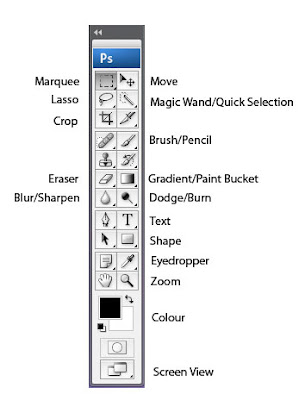 If you see a small black arrow in the lower right hand side of a tool button it means there is more than one tool available, click on the black arrow to see a drop down menu of the tools that are available.
- Always have your layer and history windows open. If you can't see these windows, click WINDOW (on the menu bar at the top of the screen) and select them from the menu.
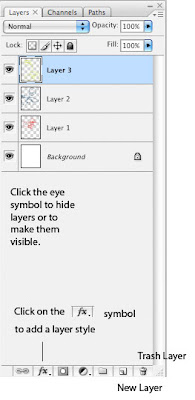 Pay close attention to the position of each layer. You can add layer styles and manipulate layers on the layer window (seen above).
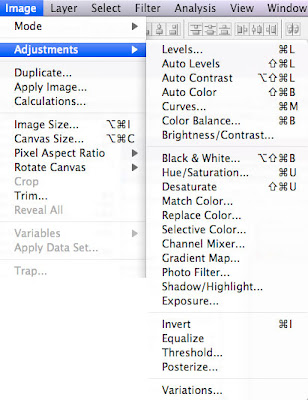
- There are a few key ways to manipulate your image using photoshop. The first is using the IMAGE menu and selecting ADJUSTMENTS. Use Adjustments to alter the brightness/contrast, hue/saturation/lightness, and selective colour adjustment:
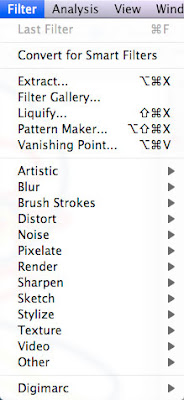
You can also alter an image using a range of different filters, these can be found under the FILTER menu. There are many different filters that will produce a range of different effects depending on your image. The best way too learn about these is to experiment!
 You can also alter basic elements like scale and position of an image using the EDIT menu and selecting TRANSFORM:

It is important to think of what your book will look like as a finished artwork but equally important to use it as an excerise in becoming familiar with photoshop. Try to experiment with as many techniques as possible.
 If you see a small black arrow in the lower right hand side of a tool button it means there is more than one tool available, click on the black arrow to see a drop down menu of the tools that are available.
- Always have your layer and history windows open. If you can't see these windows, click WINDOW (on the menu bar at the top of the screen) and select them from the menu.
 Pay close attention to the position of each layer. You can add layer styles and manipulate layers on the layer window (seen above).
- There are a few key ways to manipulate your image using photoshop. The first is using the IMAGE menu and selecting ADJUSTMENTS. Use Adjustments to alter the brightness/contrast, hue/saturation/lightness, and selective colour adjustment:

You can also alter an image using a range of different filters, these can be found under the FILTER menu. There are many different filters that will produce a range of different effects depending on your image. The best way too learn about these is to experiment!
 You can also alter basic elements like scale and position of an image using the EDIT menu and selecting TRANSFORM:
It is important to think of what your book will look like as a finished artwork but equally important to use it as an excerise in becoming familiar with photoshop. Try to experiment with as many techniques as possible.
Sunday, April 27, 2008
Week 10 - Artist Book

It is now week 10 and that means only 5 classes left to complete your Artist Books!
During class time you should be concentrating on the digital images that will fill your book. Please try to work on the actual design and construction of your book at home. Of course always bring it along to class so I can see what you are up to.
Remember you are being assessed on the quality of the digital images, the digital images need to be your top priority.
Try and be imaginative as possible!
Keep an eye out for inspiration, here are some starting points:
Bonefolder (an e-journal for artist books), you can click on each volume to download as a pdf.
Making Artist Books Today
Edited by Wulf D. von Lucius and Gunnar A. Kaldewey
Stuttgart : Lucius & Lucius, 1998
Creating Artists’ Books
Sarah Bodman
London : A & C Black, 2004
The Book as Art: Artists' Books from the National Museum of Women in the Arts
Drucker J, Wasserman K, Niffenegger A.
Princeton Architectural Press, 2006
Artists' Books on Wikipedia
Search the library and remember Google and Flickr image searches!
Monday, April 14, 2008
Week 9 - Artist Books
Some examples of artist books:


For more inspiration visit the library (The State Library of Victoria has a great collection of artist books). You can also do a google image search or a search through flickr.


For more inspiration visit the library (The State Library of Victoria has a great collection of artist books). You can also do a google image search or a search through flickr.
Wednesday, April 2, 2008
Week 8 - Artist Book
Project Three: Artist Book
This project is designed to allow you to explore a combination of found and appropriated imagery and to further expand on the skills you have developed when making the digital collage. Your artist book will be made up of a series of at least 8 digital images that you will create and print in class.
Please research book making techniques, you can be as imaginative as you like when it comes to the construction of your book! However try to complete as much of the design and construction of your book at home, leave the class time to work on your digital images.
This project is designed to allow you to explore a combination of found and appropriated imagery and to further expand on the skills you have developed when making the digital collage. Your artist book will be made up of a series of at least 8 digital images that you will create and print in class.
Please research book making techniques, you can be as imaginative as you like when it comes to the construction of your book! However try to complete as much of the design and construction of your book at home, leave the class time to work on your digital images.
Subscribe to:
Posts (Atom)